Frequently Asked Questions

Frequently Asked Questions
How long does it take for Ksher to transfer the settlement amount to the merchant’s bank account?
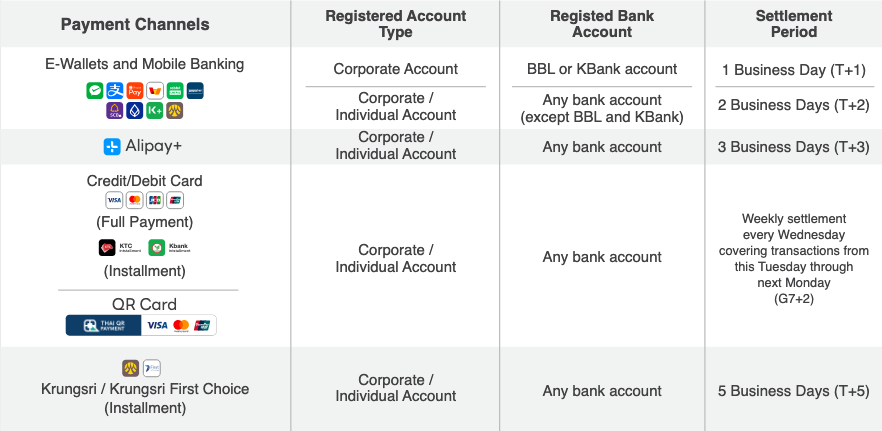
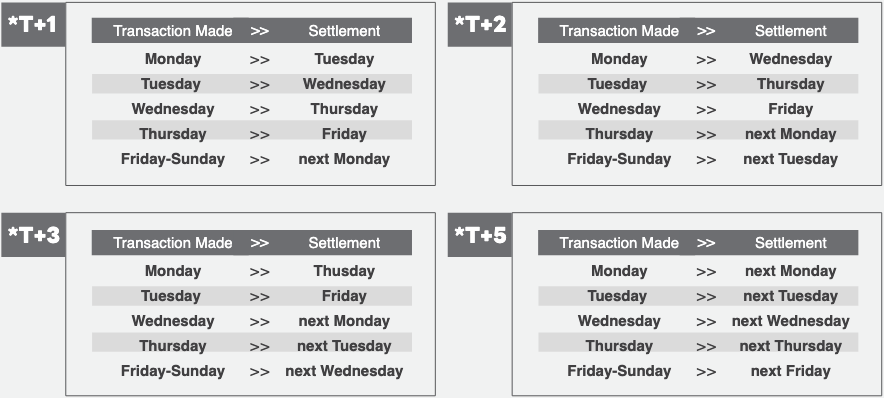
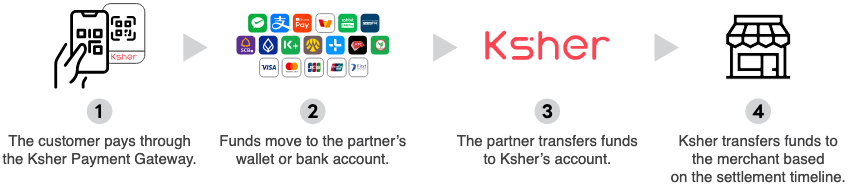
Do merchants need to manually settle payments at the end of the day?
No, merchants do not need to manually settle payments. The Ksher system automatically handles daily cut-off times as shown in the table below.
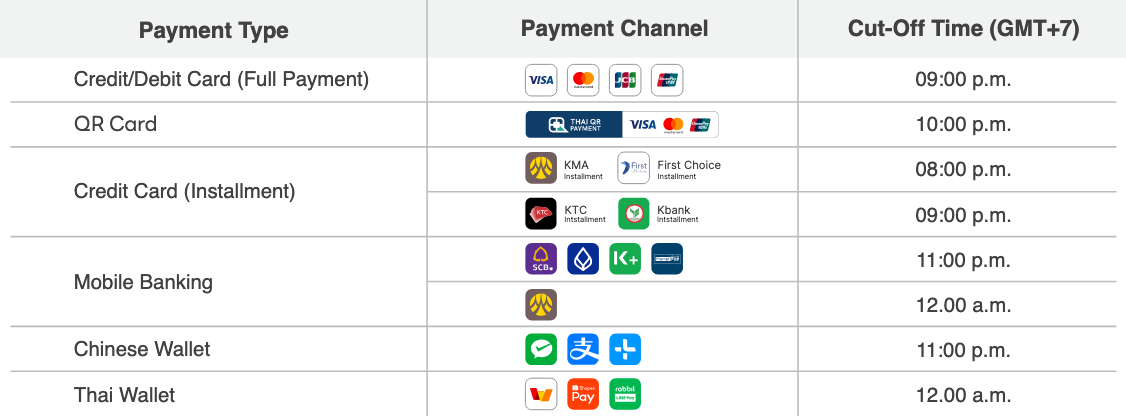
What time do merchants receive the transferred amount from Ksher each day?
Merchants receive the money from Ksher between 2:00 PM and 6:00 PM, or by 7:00 PM in case of any unexpected bank transfer issues.
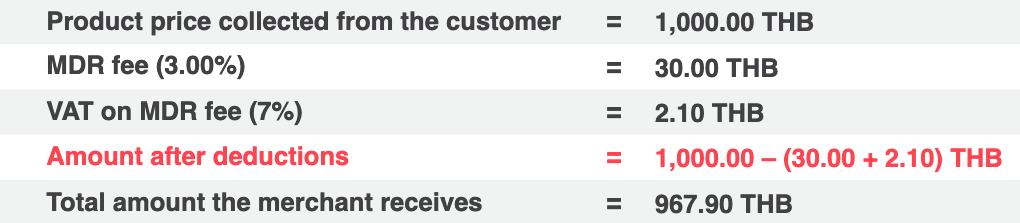
Does Ksher transfer the settlement amount for each e-wallet at once?
No, Ksher transfers the settlement amount for each payment channel separately. This approach allows merchants to easily review settled transactions from each channel.
For example, if a merchant has 4 payment channels with Ksher, they will receive 4 separate transfers.
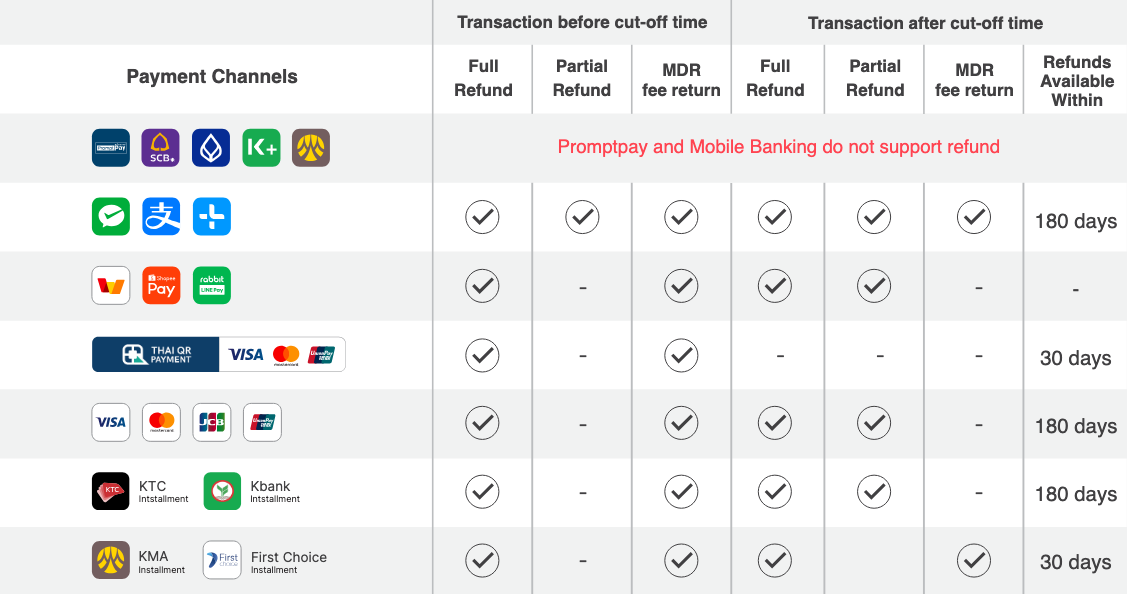
Do we support refund? What about MDR fee?
See details below;
|
If merchants need to issue a refund after the cutoff time, they have two options:
|
Does Ksher charge for settlement to merchant’s bank account?
No, however, Ksher requires a minimum transfer amount, which is 100.00 THB for each channel separately (after MDR deduction)
Example: A merchant has opened three payment channels and has received the following amounts:
-
PromptPay: 110 THB
-
TrueMoney: 90 THB
-
WeChat Pay: 30 THB
Only the funds from PromptPay will be transferred according to the regular settlement schedule.For TrueMoney and WeChat Pay, the funds will be settled once the total reaches the minimum requirement of 100 THB.
How can a merchant check transaction information?
Go to the merchant portal merchant.ksher.net/th and log in. You can view real-time transaction amounts, merchant details, and settlement details. Reports are also available for download.
Does Ksher provide bank payment slips and tax invoices?
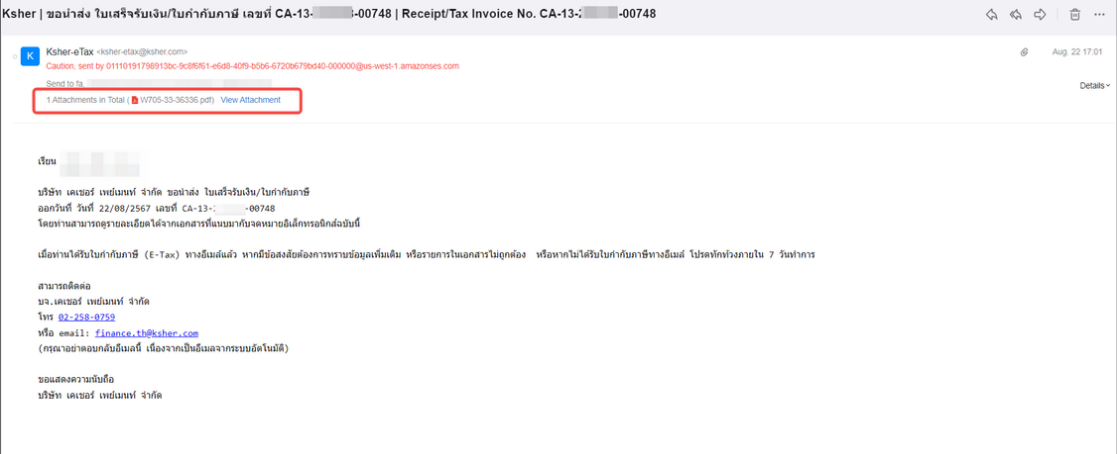
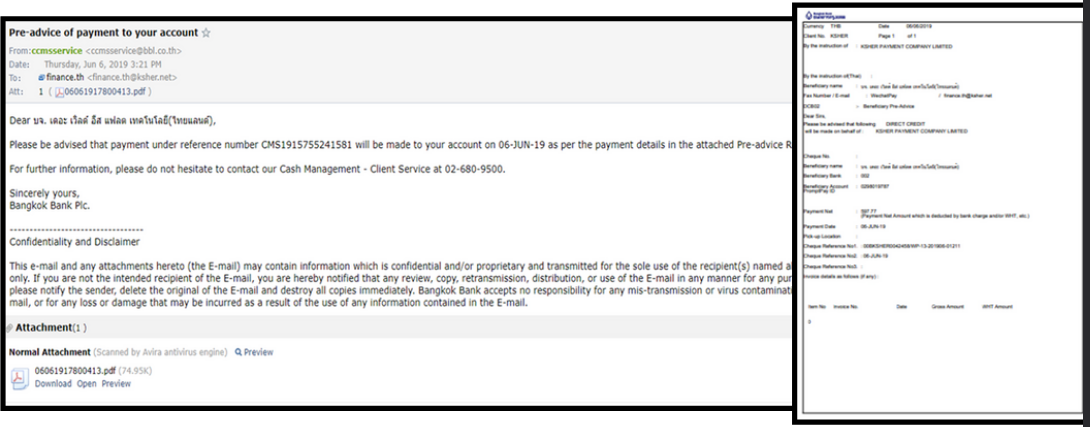
Yes. Ksher sends a bank payment slip and an e-tax invoice to the merchant’s registered email address daily.
Ksher withholds a 3% tax for corporate merchants and reports this information to the Revenue Department under the merchant’s name.
|
If you do not receive the e-tax invoice within 7 days, please contact Ksher Customer Support. For updates to tax invoice-related information, please contact Ksher Customer Support. |
How to change merchant’s information detail?
Please contact Ksher Customer Support, we will:
-
Provide Change Request Form for merchant to fill out
-
Send the form to kyc@ksher.com
-
If filled out properly, information will be updated within 3 business days
Finance Question
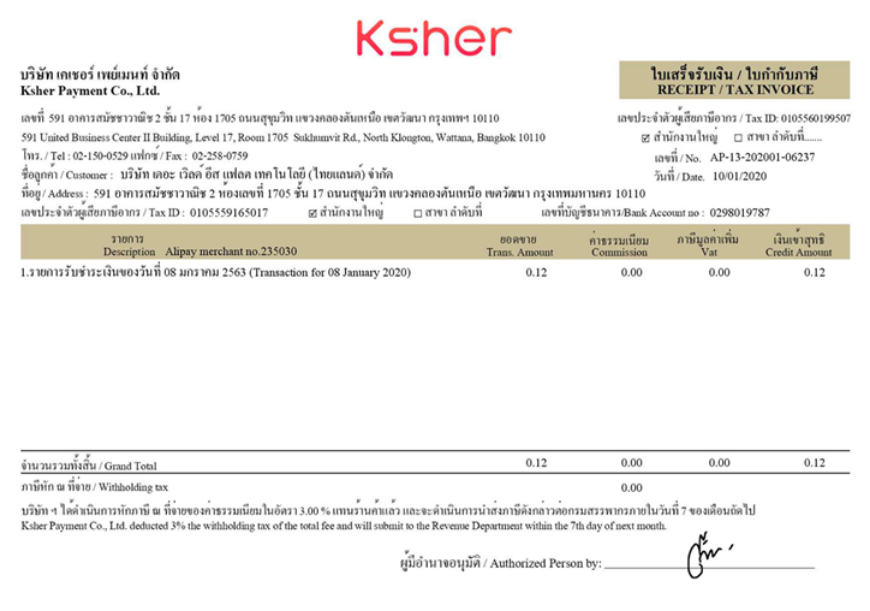
List all of tax invoices and Credit note format
The details of the English letters of the tax invoice number of each payment channel are as follows:
| No. | WALLET | TAX INVOICE | CREDIT_NOTE |
|---|---|---|---|
1 |
WeChat Pay |
WP-13-YYYYMM-xxxxx |
CN-WP-YYYYMMxxxxx |
2 |
Alipay |
AP-13-YYYYMM-xxxxx |
CN-AP-YYYYMMxxxxx |
3 |
TrueMoney |
TP-13-YYYYMM-xxxxx |
CN-TP-YYYYMMxxxxx |
4 |
LINE Pay |
LP-13-YYYYMM-xxxxx |
CN-LP-YYYYMMxxxxx |
5 |
ShopeePay |
RP-13-YYYYMM-xxxxx |
CN-RP-YYYYMMxxxxx |
6 |
PromptPay |
PP-13-YYYYMM-xxxxx |
CN-PP-YYYYMMxxxxx |
7 |
PromptPay2 |
BP-13-YYYYMM-xxxxx |
CN-BP-YYYYMMxxxxx |
8 |
KTB Card |
CA-13-YYYYMM-xxxxx |
CN-CA-YYYYMMxxxxx |
9 |
KTC Card |
KT-13-YYYYMM-xxxxx |
CN-KT-YYYYMMxxxxx |
10 |
KTC Installment |
CI-13-YYYYMM-xxxxx |
CN-CI-YYYYMMxxxxx |
11 |
KBANK Card |
KC-13-YYYYMM-xxxxx |
CN-KC-YYYYMMxxxxx |
12 |
BualuangM |
PD-13-YYYYMM-xxxxx |
CN-PD-YYYYMMxxxxx |
13 |
SCB EASY |
BD-13-YYYYMM-xxxxx |
CN-BD-YYYYMMxxxxx |
14 |
K PLUS |
KD-13-YYYYMM-xxxxx |
CN-KD-YYYYMMxxxxx |
15 |
KBANK Installment |
KI-13-YYYYMM-xxxxx |
CN-KI-YYYYMMxxxxx |
16 |
KMA |
SD-13-YYYYMM-xxxxx |
CN-SD-YYYYMMxxxxx |
17 |
Krungsri Installment |
KSI-13-YYYYMM-xxxxx |
CN-KSI-YYYYMMxxxxx |
18 |
Krungsri Firstchoice Installment |
KFI-13-YYYYMM-xxxxx |
CN-KFI-YYYYMMxxxxx |
19 |
PromptPay3 |
KP-13-YYYYMM-xxxxx |
CN-KP-YYYYMMxxxxx |
20 |
Alipay+ |
AX-13-YYYYMM-xxxxx |
CN-AX-YYYYMMxxxxx |
21 |
QR Card |
QRS-13-YYYYMM-xxxxx |
CN-QRS-YYYYMM-xxxxx |
YYYY = Year in number. example 2023
MM = Months in number. example 03
xxxx = Running Number. example 12345
Credit note is tax invoice send when refund not same day.
KP-13-202303-12345
Meaning
-
Tax Invoice Shopeepay
-
At March 2023
-
Running in system number 12345
CN-KP-20230312345
Meaning
-
Credit Note Shopeepay
-
At March 2023
-
Running in system number 12345
Payout Function FAQ
-
Ksher’s minimum payout amount is 1 THB per transaction, with a maximum limit of 2,000,000 THB per transaction.
-
After entering the password to confirm the payout, the transaction cannot be reversed or recalled.
-
After entering the password to confirm the payout, the funds will be transferred to the beneficiary’s account immediately.
-
There is currently no limit on the number of bills that can be processed in a batch transfer.
-
Payout transfers are supported only for Thai bank accounts and PromptPay (ID number / Mobile number).
-
Ksher will issue an electronic receipt/tax invoice (E-Tax) for payout service fees on every day that transactions occur.
IT FAQ
Where to download the private KEY
You need to access your merchant portal for resetting/downloading your private KEY.Please get it from https://merchant.ksher.net
For more detail please see How to download Private key Page.
Where to find my merchant No.?
please see How to find Merchant No. Page.
Where can I find samples for a specific integration scenario.
If you are using SDK, there is sample included in each SDK package. If you are using API, please ask in the support channel and we will be happy to provide.
Is there a solution for my use case
Please raise your question in the support channel. We will be happy to hear from you.
How to calculate the "sign" field in the API request message.
The sign field is generated using RSA signature algorithm, Please read Signature Algorithm for detail.