KIOSK (C Scan B) Integration Guide
Overview
In this document, a kiosk refers to a device with a customer-facing screen that can display a dynamically generated QR code with embedded transaction amount information.
To enable a kiosk to accept payments from customers, there are two options:
-
Use the Gateway Pay API. In this case, the kiosk works like a PC website. Please refer to Website Integration Guide for details.
-
Use the Native Pay API. In this case, the kiosk calls the Native Pay API to get a QR code image, then displays it on screen for customers to scan and pay.
This document focuses on option 2 (Native Pay API). You can refer to Website Integration Guide for option 1.
Payment Flow Sequence Diagram
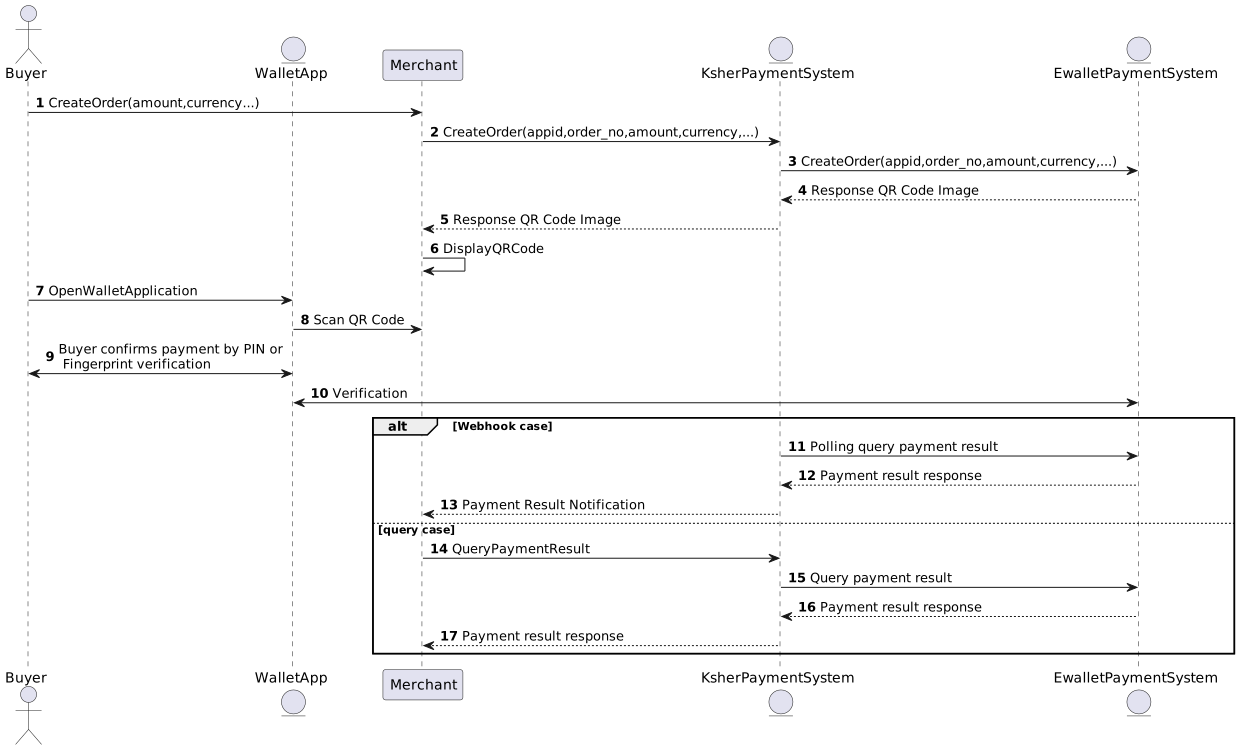
Using Native Pay API for C scan B
The payment information flow is as below. The native pay supports Alipay, WeChat Pay and Prompt Pay payment channel. For the sake of simplicity, we use WeChat Pay as an example. For Alipay and PromptPay the information flow is similar.
-
The buyer Select QR want to pay.
-
The merchant create order by API.
-
API returns QR Code image/value.
-
The Merchant displays the QR code image on their screen/platform.
-
The buyer open the Ewallet App/mobile banking on mobile.
-
The buyer scan the QR code.
-
The buyer confirms the payment by entering PIN/fingerprint.
-
The merchant get the payment result by API order_query, or API Notification sendback.


Specifications of Native Pay APIs
Native Pay Account Type Support by Wallet
Please see account type support by wallet for full details.
channel parameter |
channel description |
native_pay |
order_query |
order_refund |
refund_query |
minimum pay |
|
|---|---|---|---|---|---|---|---|
offline |
online |
||||||
promptpay |
PromptPay QR code (Thailand standard bank transfer QR code). |
✔ |
✔ |
✔ |
✖ |
✖ |
1 THB |
alipay |
Alipay |
✔ |
✖ |
✔ |
✔ |
✖ |
1 THB |
alipayplus |
Alipay+ |
✔ |
✖ |
✔ |
✔ |
✖ |
1 THB |
WeChat Pay |
✔ |
✔ |
✔ |
✔ |
✔ |
1 THB |
|
airpay |
ShopeePay |
✔ |
✖ |
✔ |
✔ |
✔ |
1 THB |
scb_qrcard |
QR Credit/Debit Card. |
✔ |
✔ |
✔ |
✔ (refund support only same day) |
✔ |
1 THB |
truemoney |
TrueMoney |
✖ |
✔ |
✔ |
✔ |
✔ |
1 THB |
|
For WeChat Pay, Alipay, and Alipay+, users must scan the QR code from the displayed image. Opening a saved image to read the QR code is not supported. |
Order Apply
Please see Native Pay API
Order Query
Please see Order Query API
Notify URL
Please see Notify URL
Order Refund
Please see Order Refund API
Refund Query
Please see Refund Query API
Order Close
Please see Order Close API
QR Expiration Time
API Request Examples
The QR expiry time can be specified through the expire_time field. The value is specified in second. The following example sets the QR code to expire after 30 minutes.
{
    "appid": "mch35005",
    "mch_order_no": 1789011926,
    "total_fee": "100",
    "fee_type": "THB",
    "channel": "promptpay",
    "product": "1789011926",
    "device_id": "test",
    "attach": "payer_name expire_time30",
    "notify_url": "https://notify_url/api/notify_url",
    "expire_time": 1800,
    "nonce_str": "fagfsere",
    "time_stamp": "1789011926",
    "sign": "4b609e384500ba8b2ed5eddbcc3aab5c7325c45"
}
PromptPay
-
If
expire_timeis not specified, the QR code will remain without an expiry time, as per the existing behavior. -
If the payer attempts to make a payment after the time specified in
expire_time, the QR code will be displayed as invalid, and the payer will not be able to complete the payment using the expired QR code. A new QR code must be created to make the payment.
PromptPay Type Support
Ksher’s PromptPay services currently support expiry time as follows:
-
PromptPay / PromptPay2: The expiry time can be specified through the expire_time field.
-
PromptPay3: The expiry time is fixed at 10 minutes according to the partner bank’s conditions.
Conditions and Limitations
-
For some transactions where the payer is a foreign customer, the expiry time may not be supported because the relevant overseas bank does not yet support this functionality.
-
If the transaction status update from the bank is delayed, a payment may be received after the QR code has already reached its expiry time.
-
order_closecurrently not support cancelling a QR code that has already been created. -
For an expired QR code, the transaction status in the system will remain IN_PROCESS, as per the existing behavior.

Truemoney
-
can setup time wallet → Yes, at tmn_expire_time
-
expire_time min → 0
-
expire_time max → unlimited depend on customer
-
default time expire_time, If merchant leave value tmn_expire_time → 1 day
Alipay
-
can setup time wallet → No
-
expire_time min → can’t setup
-
expire_time max → can’t setup
-
default time expire_time, If merchant leave value expire_time → 3 hours
Alipay+
-
can setup time wallet → No
-
expire_time min → can’t setup
-
expire_time max → can’t setup
-
default time expire_time, If merchant leave value expire_time → 10 minutes
-
can setup time wallet → No
-
expire_time min → can’t setup
-
expire_time max → can’t setup
-
default time expire_time, If merchant leave value expire_time → 2 hours
Error Codes
| Name | Description | Reason | Solution |
|---|---|---|---|
APPID_NOT_EXIST |
APPID not exist |
APPID was absent in parameters. |
Please check if the APPID is correct. |
APPID_MCHID_NOT_MATCH |
APPID and MCHID not match |
APPID and MCHID not match |
please check if the APPID and mchid match. |
INVALID_ORDER_NO |
invalid order no. |
order no. passed in is not correct. |
parameter error, please check if the original order no. passed in exist or if the original order is failed. |
KSHER_SIGN_ERROR |
signature error |
merchant signature is not correct |
Generally, this means that the signature parameter is incorrect. However, signature generation involves multiple factors, including: - The private key of the merchant being used - The data used to generate the signature parameter Typically, if an SDK has not been newly developed, we recommend checking whether the private key in use is the latest version downloaded from the merchant platform. If you have developed the API yourself, we recommend verifying that your signature generation follows the format outlined in Signature Creation. |
KSHER_SYSTEMERROR |
Error occurred during handling the request. |
Error occurred during handling the request. |
Issue the refund request again. |
KSHER_VERSION_ERROR |
API version used by merchant is not compatible with the API of the vendor |
API version used does not match |
contact the vendor to confirm current API version |
KSHER_ERROR_ORDER_NO |
Missing order no parameter |
Missing order no parameter |
Check the order no.(mch_order_no, ksher_order_no, channel_order_no) |
KSHER_REFUND_EXPIRE |
Refund can not be made via API by merchant after the order already settled. |
Refund can not be made via API by merchant after the order already settled. |
Please submit refund request on the Ksher merchant platform. |
KSHER_INVALID_MCHINFO |
merchant information is not correct |
the appid passed in does not exist in the vendor’s system |
confirm if the appid passed in is correct, contact the vendor if needed. |
KSHER_INVALID_ORDER_NO |
order no. does not exist |
the order no. passed in cannot be found in vendor’s system |
check if the order no. passed in is correct |
KSHER_INVALID_REFUND_FEE |
invalid amount to refund |
amount to refund is greater than the available amount |
check if the amount to refund is correct |
KSHER_INVALID_REFUND_AMOUNT |
Partially refund is not allowed |
Partially refund is not allowed |
refund completely is allowed. |
KSHER_INVALID_REFUND_BALANCE |
The balance amount of this order(price fee minus amount already refunded.) is not enough for the amount to refund. |
The balance amount of this order(price fee minus amount already refunded.) is not enough for the amount to refund. |
Check the amount to refund. |
KSHER_INVALID_REFUND_ORDER_NO |
invalid refund order no. |
the refund order no. passed already used. |
check if the refund order no. passed in, use a new one. |
KSHER_INVALID_REFUND_FEE_OR_TYPE |
Refund currency or amount invalid |
Refund currency or amount invalid |
Check the currcency or amount to refund. |
KSHER_PARAM_OVERLENGTH |
Some parameters are too long. |
Some paramters are too long |
Check the parameters. |
KSHER_INVALID_PARAM |
Missing parameter(s) |
Some parameter(s) invalid |
Check parameter(s) is correct |
KSHER_API_ERR_ORDER_TOO_MANY_REQUESTS |
Too many order query requests |
The same |
Reduce query frequency and keep at least a 10-second interval per |
KSHER_DUPLICATED_ORDERNO |
The merchant order no already used. |
The merchant order no already used. |
Use a new order no to make the order again. |
KSHER_EXCEED_AMOUNT_LIMIT |
the amount to pay exceeds the amount limit configured |
the amount to pay exceeds the amount limit configured |
make sure if the amount to pay exceeds the limit. |
KSHER_FEETYPE_NOT_MATCH |
fee type does not match |
pricing fee type does not match the registered fee type |
merchant needs to modify the program, if merchant is sure that the fee type passed in is correct, contact the vendor. |
KSHER_DUPLICATED_ORDERNO |
The merchant order no already used. |
The merchant order no already used. |
Use a new order no to make the order again. |
KSHER_DUPLICATED_REFUND_ORDERNO |
invalid refund order no |
the refund order no. passed already used. |
check if the refund order no. passed in, use a new one. |
KSHER_AMOUNT_IS_TOO_SMALL |
The amount is too small. |
The amount is too small |
Pass in a larger amount |
KSHER_CHANNEL_RESPONSE_ERROR |
Error occurred during query operation |
Error occurred during query operation |
Make an order query again. |
LACK_PARAMS |
parameter absent |
mandatory parameter(s) was absent |
please check if the parameters were sufficient |
MCHID_NOT_EXIST |
MCHID not exist |
MCHID was absent in parameters. |
please check if the MCHID is correct. |
NOAUTH |
the merchant has no access to this interface. |
the merchant has not yet got the access to this interface. |
contact the vendor(Ksher) |
NOT_UTF8 |
coding format error |
required coding format was not used. |
please use UTF-8 coding |
NOTENOUGH |
Not enough unsettled fund for refund |
There is not enough unsettled fund for refund |
This error code means refund request failed due to not enough unsettled fund for refund.Merchants need to contact Ksher to authorise credit for this kind of situation. If unsettled fund is enough ,please call the refund API once there is enough unsettled fund, or retry it continuously. |
ORDERPAID |
order closed already |
the order closed already. |
the order no. is already closed, please launch a new order. |
ORDERNOTEXISTR |
the order no. does not exist |
the order does not exist in the system |
merchant need to check if the order no. is correct. |
OUT_TRADE_NO_USED |
repetitive out_trade_no |
the same order cannot be submitted for multi times. |
please verify whether the out_trade_no. was submitted repetitively |
PARAM_ERROR |
parameters error |
parameters requested are not correct |
check the application according to the information returned, contact the vendor if needed. |
POST_DATA_EMPTY |
post parameters are empty |
post parameters should not be empty |
please check the paremeters posted in the http request. |
REQUIRE_POST_METHOD |
please use POST method |
the method used to pass the parameters was not POST. |
please check if the parameters was passed by POST method |
SYSTEMERROR |
system error |
system timeout |
call the order query API immediately to check order status, and decide next step according to the status of the order |
SIGNERROR |
signature error |
the signature parameter is not correct |
please check if the signature parameter and method meet the requirements of signature algorithm |
TRADE_STATE_ERROR |
order state error |
there will be latency for the result for refund application, please query later(20 minutes for balance payment, 3 workdays for card payment) |
|
USER_ACCOUNT_ABNORMALE |
refund failed |
user account is exceptional or unregistered. |
this status stands for the failure of the refund operation, merchant can handle the refund by himself. |
XML_FORMAT_ERROR |
XML format error |
XML format error |
please check whether the format of XML parameters is correct. |
SHOP_ID_ERROR |
Invalid merchant information |
Invalid merchant information |
Please check if the APPID is correct. |
CANCEL_ERROR |
The cancellation failed |
The cancellation failed |
Order cannot cancel because of wallet not support or already paid |
ORDER_NOT_EXIST |
This order does not exist. |
Not found this order |
Check mch order no is correct or not |
USER_NOT_EXIST |
This user does not exist. |
Not found this order |
Check mch order no is correct or not |
ORDER_NOT_PAY |
This order has not been paid. |
This order has not been paid. |
Order still not paid |
ORDER_ALREADY_REFUND |
This order has been refunded. |
This order has been refunded. |
order has been refunded. |
REFUND_FAILED |
Refund failed. |
Refund failed. |
check value is correct |
EXPIIRE_ORDER |
The order has timed out |
The order has timed out |
expired time set in order is timeout |
ORDER_ERROT |
Order number must be unique |
Order number must be unique |
Check order should be not duplicate or create before |
SHOP_NOT_EXIST |
This shop does not exist |
This shop does not exist |
Please check if the APPID is correct. |
PRICE_NOT_EXIST |
Invalid price |
Invalid price |
Check amount should be not 0 or create this order before |
MCH_ORDER_ERROR |
Duplicate order number |
Duplicate order number |
Check order should be not duplicate or create before |
RADIS_DOES_NOT_EXIST |
Redis does not exist |
Check url is correct |
|
QUERY_ORDER_ERROR |
Search for failed not completed transaction |
Search for failed not completed transaction |
check your value is correct |
ORDER_PAYMENT_ERROR |
Your payment failed |
Your payment failed |
Retry to paid again |
SMS_CODE_ERROR |
Failed to receive OTP code |
Failed to receive OTP code |
check you mobile phone is correct |
CHANNEL_LIST_ERROR |
You have not apply for any ewallets nor credit card payment services |
You have not apply for any ewallets nor credit card payment services |
Check that the channel value in your request is correct and that the requested payment channel is enabled for your merchant account. If the payment channel has not been enabled, please contact the Ksher team for assistance. |
MEMBER_ID_ERROR |
member_id cannot be number only |
member_id cannot be number only |
Please check your member_id not use Real number like 1,1200,00001, but can use string with number like ABC1234. |
SAVE_CARD_ERROR |
Failed to save card |
Failed to save card |
Check Bank card channel can support save card function |
MEMBER_CARD_ERROR |
This card cannot be used |
This card cannot be used |
This card is not available, please change card to paid |
EMPTY_CARD_NO |
Card information is incorrect |
Card information is incorrect |
Check your card input information |
DELETE_MEMBER_CARD_ERROR |
Failed to delete card |
Failed to delete card |
Refresh page and try to delete again |
MEMBER_CARD_NOT_EXIST |
This card does not exists |
This card does not exists |
check your member_id is correct |
MEMBER_ID_LENGTH_OUT_OF_LIMIT |
member_id cannot be more than 32 characters |
member_id cannot be more than 32 characters |
Please check your member_id not use Real number like 1,1200,00001, but can use string with number like ABC1234. and member_id cannot be more than 32 characters |
ORDER_ALREADY_CANCEL |
The order has been canceled |
The order has been canceled |
This order already cancel, Please try to create the new order. |
ORDER_ALREADY_CANCEL_OPERATION_CANNOT_BE_PERFORMED |
The order has been canceled, this action cannot proceed |
The order has been canceled, this action cannot proceed |
This order already cancel, Please try to create the new order. |
ORDER_ALREADY_PAY_OPERATION_CANNOT_BE_PERFORMED |
This order has already been paid, this action cannot proceed |
This order has already been paid, this action cannot proceed |
This order already paid, Please try to create the new order. |
ORDER_ALREADY_PAYMENT_SUCCESS |
Order has been completed |
Order has been completed |
This order already paid, Please try to create the new order. |
INSTAL_FEE_PAYER_ERROR |
Failed to apply setting of interest-bearing |
Failed to apply setting of interest-bearing |
check at instal_fee_payer_merchant_channel_list or instal_fee_payer is correct |
TRUEMONEY_OPT_CODE_ERROR |
Wrong OTP code |
Wrong OTP code |
check OTP is correct |
MANY_OPEN |
Someone is paying this bill. DO NOT pay twice. |
Someone is paying this bill. DO NOT pay twice. |
check on exclusive is turn on or not. if have another person open payment page |
LANG_REPEAT_SUBMIT |
Repetitive submission |
Repetitive submission |
order already create before, create the new one. |
KSHER_CURRENT_ORDER_RISK_FREEZE |
The current order has been frozen by risk control measures. Please contact Ksher. |
The current order has been frozen by risk control measures. Please contact Ksher. |
Please contact Ksher. |
KSHER_API_ERR_IP_NOT_ALLOWED |
The source IP address is not allowed for this merchant. |
API requests from IP addresses not included in the IP Whitelist. |
Send the API request from an IP address configured in the merchant’s IP Whitelist. If you need to add a new IP address to the IP Whitelist, please contact the Ksher team for assistance. |